
ClientDesk: The Client Portal That Helps You Win the Deal
Give prospects a self-service experience your competitors can’t match, and give existing clients one less reason to shop around. ClientDesk answers their questions before they ask.

Trusted Workforce Operations Platform for EOR, PEO, Staffing, and Accountant Firms


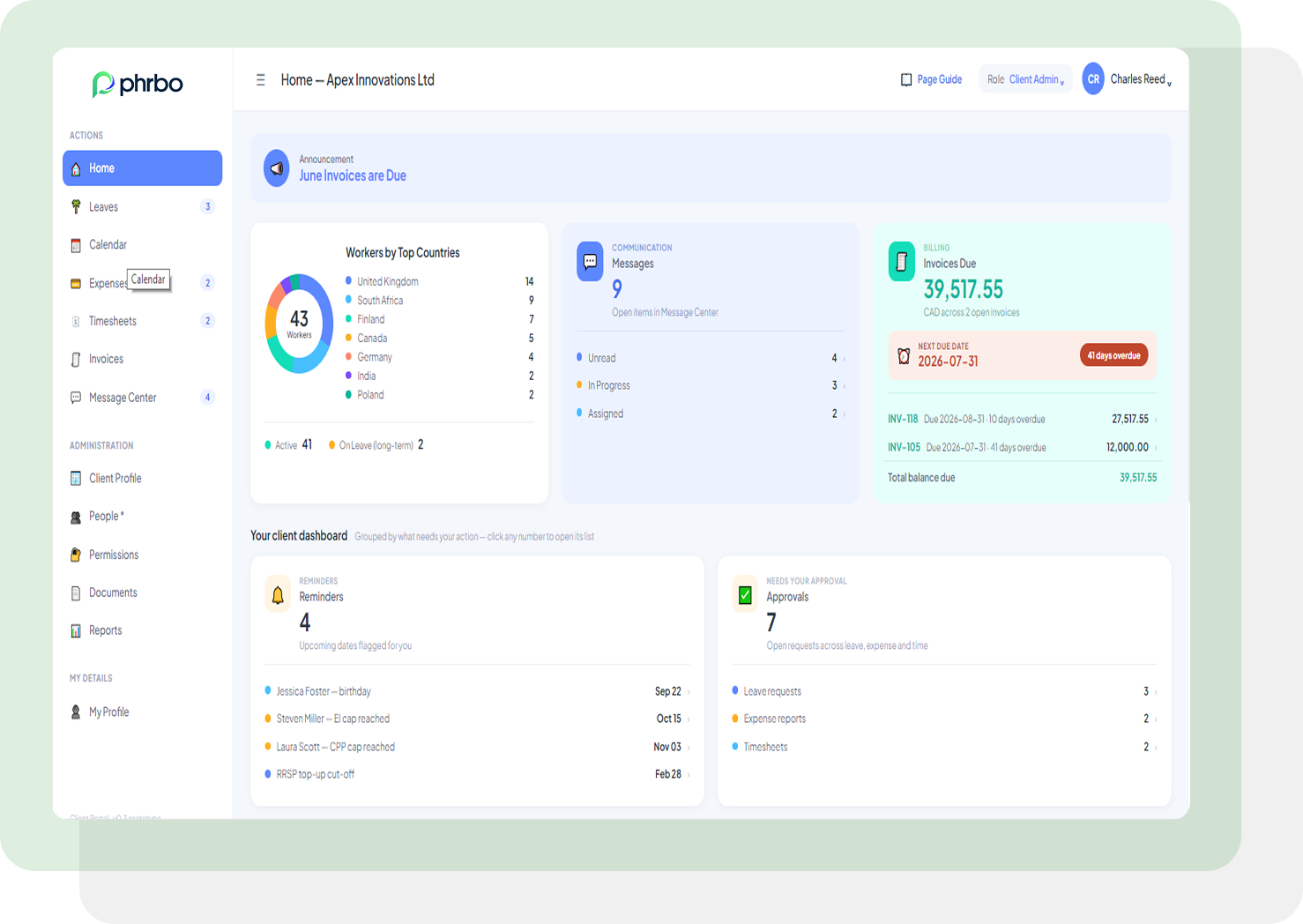
Full Visibility Into What They’re Sponsoring
Clients stop waiting on your payroll team to confirm a pay date, tax rate, or payment method. ClientDesk puts pay schedule, tax rate, payment method, and retainer information for every worker in one profile view, ready the moment a client needs it, not the moment your team responds.
Oversight of Leave and Time, in One Calendar
Clients view their custom leave policies and manage worker requests without opening a ticket with your HR team. A calendar view lays leave and timesheets out side by side, so a client sees who’s out and what’s logged for the pay period in one glance instead of checking two systems.
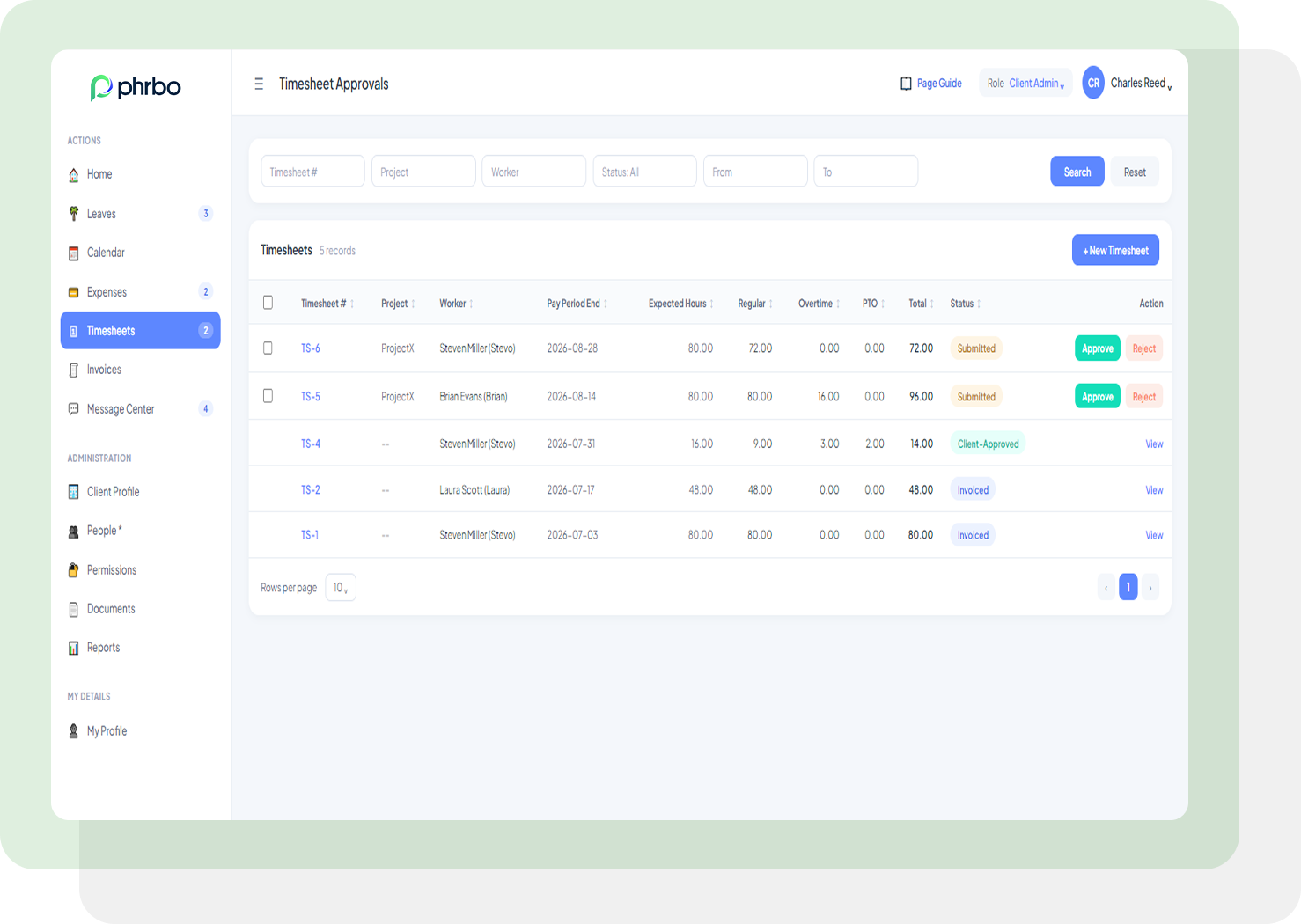
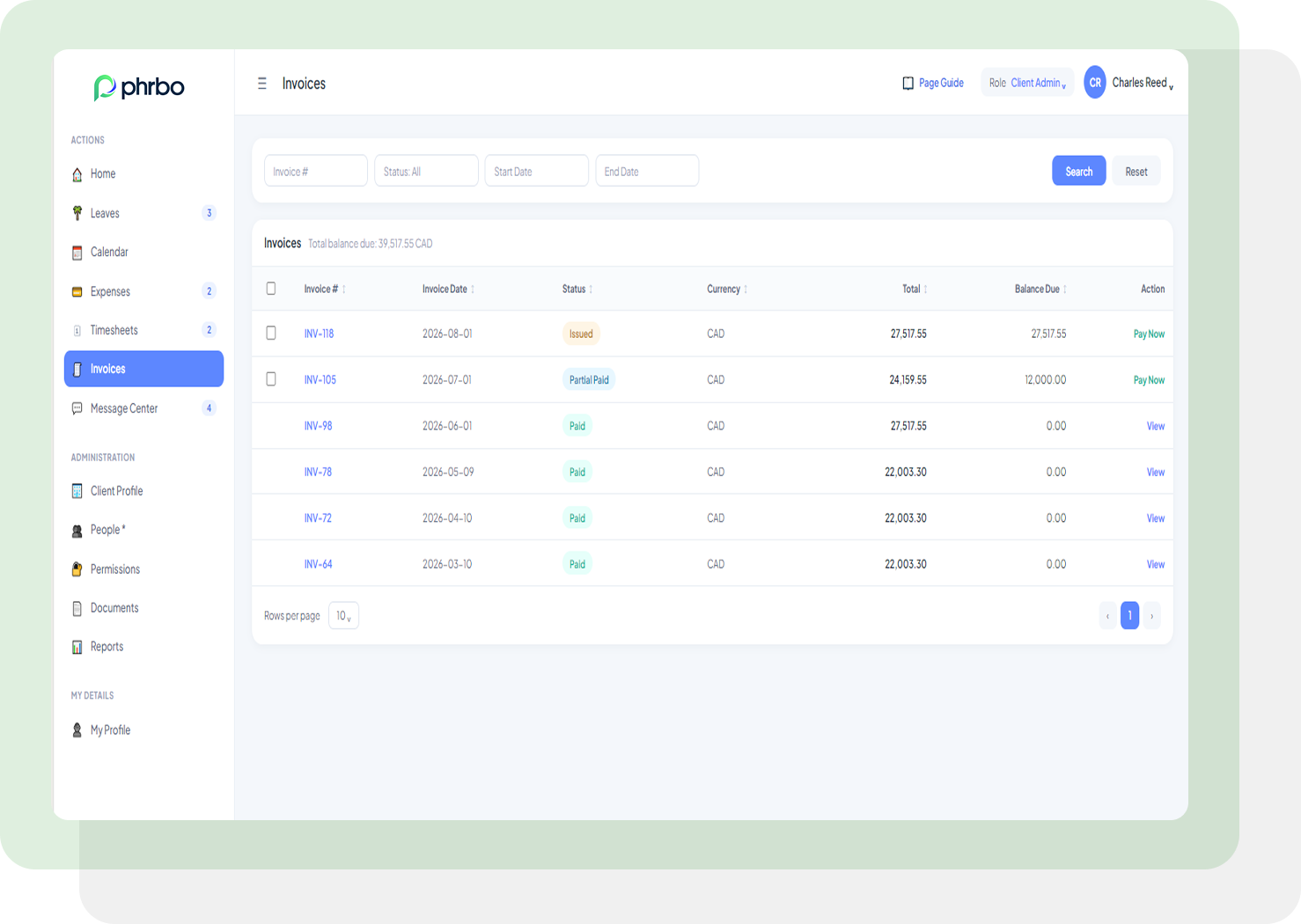
Sign Off on Hours and Invoices
Clients approve or reject timesheets for their entire worker roster in one action instead of reviewing hours worker by worker, then move straight to invoicing without a manual handoff. Every invoice shows its status: paid, partial paid, or issued, so a finance lead checks billing without a call to your team.
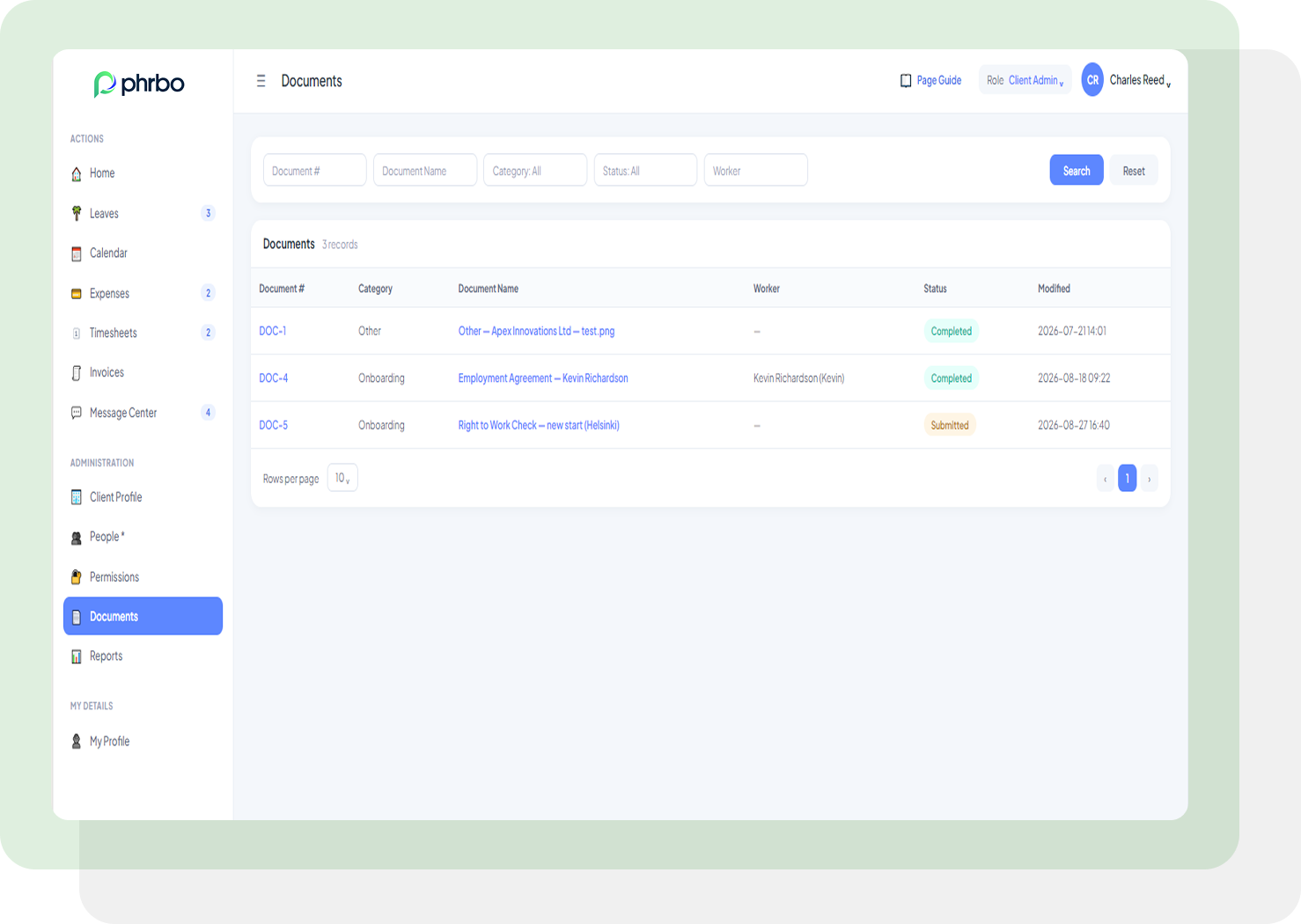
Review Worker Documents and Requests
Clients pull worker documents and filter by category, status, name, number, or date instead of asking your document team to send a file. Built-in reports give clients the workforce data they’d otherwise request by email, and the message center handles the rest, a details change, a pay schedule update, without a separate support thread.
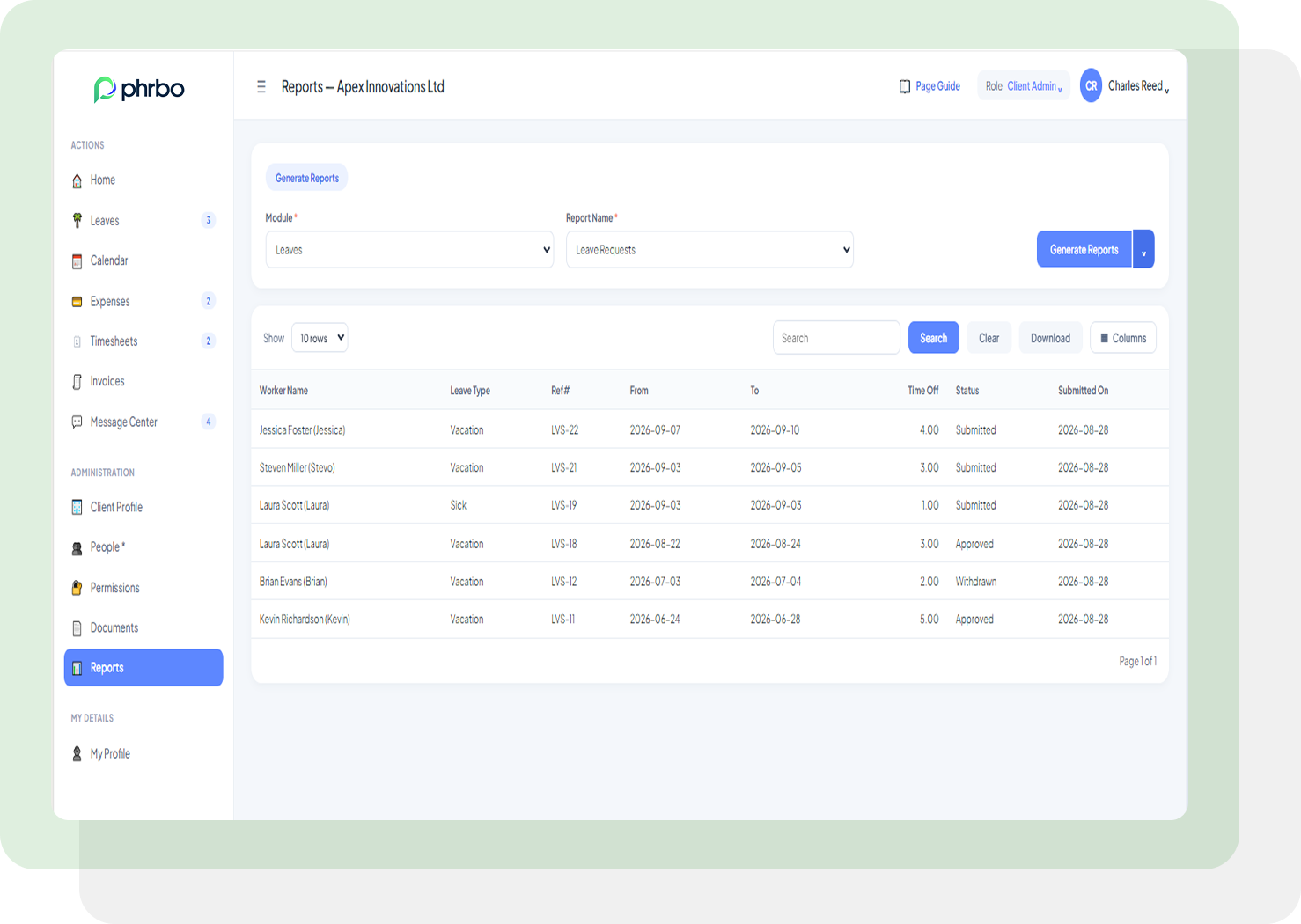
Workforce and Spend Reports at a Glance
Clients don’t run your invoicing or payroll operations, but they still need the numbers those operations produce. ClientDesk reports pull straight from timesheets and invoices already in the system, giving a client visibility into cost and headcount for their sponsored worker without asking your team to build anything.
ClientDesk Features Built for Self-Service

Full Worker Profiles, No Waiting on Payroll
Pay schedule, tax rate, contract terms, and retainer details in one view, so clients confirm a worker’s terms without emailing your team.

Leave Entitlements Clients Decide, You Administer
Clients set the leave entitlement their sponsored worker gets; your platform handles accrual tracking and compliance without a back-and-forth.

A Calendar View of Leave and Timesheets
Leave and logged hours sit side by side on one calendar, so a client sees workforce availability at a glance instead of checking two systems.

Timesheets Organized by Project
Regular, overtime, and PTO hours break out by project and worker, so a client tracks labor cost without requesting a report.
Hours Confirmation for Off-Schedule Work
When a sponsored worker logs hours outside their standard schedule, a client confirms them directly instead of routing a change request through your team.
Sign Off on a Whole Roster in One Click
Clients verify timesheets for their entire worker roster from one dashboard, cutting a line-by-line review down to a single sign-off.
Bulk Invoice Actions
Approved timesheet hours move to billing in bulk, so clients skip the manual handoff between sign-off and invoicing.
Invoice Status Without the Email
Every invoice shows paid, partial paid, or issued status, so clients know where a bill stands without a message to billing.
Invoice Permissions by Role
Admin and billing users see invoice data inside ClientDesk. Other roles stay scoped to worker and timesheet data, so access matches responsibility.
Worker Document Downloads
Clients pull worker and employee documents directly for internal review, without a request to your document or back-office team.
Quick Document Filters
Documents are searchable by category, status, name, number, or date, so a client finds a specific file in seconds instead of scrolling a shared folder.
Workforce Reports On Demand
Clients pull the workforce and spend reports they’d otherwise request by email, with data drawn straight from timesheets and invoices.
A Message Center Built Into the Login
Clients raise a request with your Admin and Billing teams directly inside ClientDesk, and your team executes it. No separate email thread to track.
Structured Worker Requests
Clients flag a request per worker, a details change, a pay schedule change, another update, tied directly to that worker’s record, for your team to act on.
Who We Help

Employer of Record (EOR)
PHRBO takes the stress out of compliance, invoicing, and onboarding, giving EOR teams a smoother way to manage global workers and scale without the headaches.
Professional Employer of Organization (PEO)
PEO system by PHRBO helps PEOs simplify busy HR workflows and stay organized, so they can serve clients faster and deliver a more reliable experience.

Accounting & Payroll Providers
PHRBO’s embedded invoicing system brings all payroll data into one place and handles the heavy lifting behind the scenes, helping firms work more accurately with far less manual effort.
Staffing & Recruitment Agencies
PHRBO keeps candidates, jobs, and onboarding in sync, making it easier for staffing teams to fill roles quickly and keep clients and candidates happy.
Why Choose PHRBO
PHRBO was born out of understanding the pains of staffing, Employer of Record (EOR) and Professional Employer Organization (PEO) companies who desperately needed to streamline operations to keep up with growth. We recognized that payroll businesses lacked specialized software and set out to change that.
Our mission: to provide local PEOs and EORs with enterprise-grade tools—configurable to any business model and scalable to thousands of users. Today, PHRBO democratizes payroll operations software, leveling the playing field for local providers to compete with the Global providers.
Don’t take our word
for it, take theirs

Saving one day plus each
month!
PHRBO’s automation has cut our invoicing time from days to hours—saving us both time and effort.
A.M.
Senior Payroll Admin
Funding visibility impacting
AR
I was skeptical at first, but PHRBO’s visibility into pay funding has empowered my team to make smarter decisions, ultimately reducing AR.
J.F.
EOR Owner
Great HR functionality
I ‘PHRBO’ (lol) all day—answering worker inquiries, approving expenses, creating estimates for clients, and more. It’s a lifesaver, tailored to our business.
E.P.
PEO HR Business Partner
Let’s Talk Payroll Business Acceleration
Gain valuable insights from
our original content
-
What Is Staff Augmentation and How Does It Work?
Staff augmentation lets a company add outside specialists to its…
-
Is Switching PEO Platforms Really as Hard as It Used to Be?
If you have put off evaluating a new PEO platform…
-
White-Label PEO Software: Build Your Brand, Not Your Vendor’s
White-label PEO software lets a PEO run its business on…


Give your clients the visibility they’re asking for — without adding to your support queue.
Check out common FAQs on PHRBO’s Client Self-service Portal
What is ClientDesk?
ClientDesk is PHRBO’s client self-service portal for EOR, PEO, and staffing providers. It gives the companies you serve direct visibility into their sponsored workers’ profiles, timesheets, invoices, leave, documents, and reports, without routing every question through your operations team.
Can clients approve timesheets themselves in ClientDesk?
Yes. Clients sign off on timesheets for their full worker roster from one dashboard, in a single action, instead of reviewing hours line by line.
Can clients see leave and timesheets in one place?
Yes. A calendar view lays leave and logged timesheet hours out side by side, so a client sees workforce availability without checking two separate systems.
Does ClientDesk support custom pay periods per worker?
Yes. Clients set a custom pay period for an individual worker tied to a specific project, separate from the standard schedule used across the rest of the workforce.
How do clients track invoice status in ClientDesk?
Every invoice displays paid, partial paid, or issued status, and permissions control which users see invoice data. Admin and billing users can view invoices inside the portal.
Can clients pull workforce reports without asking their provider?
Yes. Clients generate workforce and spend reports directly from ClientDesk, using the same timesheet and invoice data your team already tracks.
Can clients configure their own leave policies?
Yes. Clients and their HR teams configure leave policy per worker or group and manage every leave request from the same dashboard your team uses.
Can clients communicate with our team through ClientDesk?
Yes. A built-in message center lets clients raise requests with your Admin and Billing teams directly, such as a details change or pay schedule update, for your team to execute.
Can clients access worker documents through ClientDesk?
Yes. Clients download worker and employee documents directly and filter by category, status, name, number, or date to find a specific file quickly.
Recognized by


